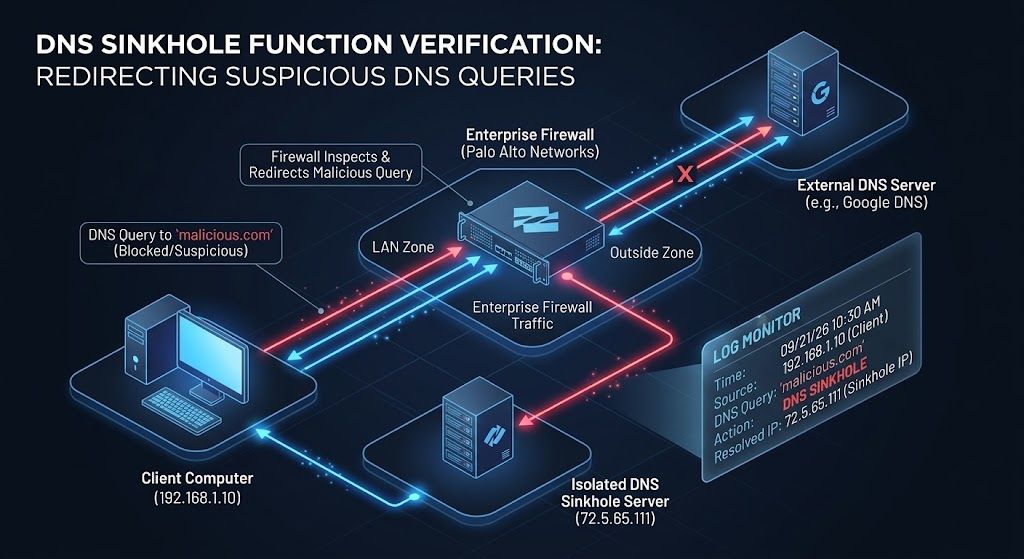
Configuring a DNS Sinkhole in your Palo Alto Networks firewall is critical for identifying infected hosts attempting to resolve malicious domains. However, verifying the sinkhole is actively working and tracking down the compromised client requires knowing exactly where to look in your PAN-OS logs based on your network’s DNS topology.
Here is how to track down the source of malicious queries:
Clients Using External DNS Servers: When the client and DNS server are on different subnets, the DNS query traverses the firewall directly to the outside. The firewall hijacks the malicious query, and you will see the actual client IP address listed as the source directly within your Threat logs.
Clients Using Internal DNS Servers: In this setup, the client queries a local DNS server, which then forwards the request outward. Because the firewall intercepts the forwarded request, your Threat logs will only display the internal DNS server’s IP address as the source. To identify the infected endpoint, pivot to your Traffic logs. Once the client attempts to reach the resolved malicious domain, it routes traffic to the sinkhole IP (e.g., 72.5.65.111). The source IP in this traffic log reveals the true compromised client.
Architectural requirement: Your configured DNS Sinkhole IP must be in the path of the firewall and the client so logs can be generated. If you configure the sinkhole with an internet IP, but the firewall itself lacks an internet path, you will never see the infected client’s connection attempts.